Dashboard
Session, account, and current upload status.
Not Login
Session: none
User: -
Login Configuration
Cookie and API Key are saved only on this local server.
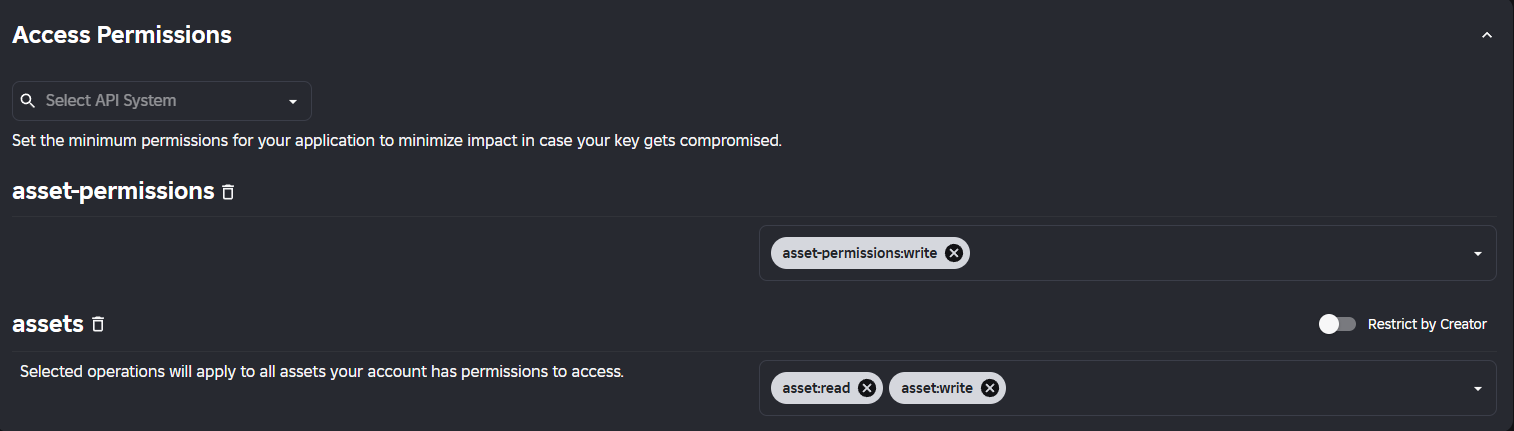
Open the setup tutorial with the exact permissions shown in your screenshot.
Fast Stream Aploader
Video converts in background while upload runs parallel.
No file selected
Upload Status
Ready.
Configuration
Video
Default uses the whole video. Long clips are okay, but avoid 1-hour videos; lower FPS for longer clips.
Upload
Detecting device...
Focus mode ready.
Realtime Output
Copy this ModuleScript into workspace.Ariscreen.Framedata.
Appearance
Simple visual settings. Background can be hidden, blur and darkness stay adjustable.
Documentation
This tool runs locally on localhost. It uploads your own frames/images to Roblox Open Cloud.
Open Cloud API Key Tutorial
Use this setup for uploading images/frames to your own account or group.
1. Upload video
Login first, choose a video, set FPS/duration/resolution, then press START FAST UPLOAD. The video is converted in the browser and frames are uploaded in parallel.
2. Upload existing frames
Press CHOOSE IMAGES if you already have frames. The tool uploads the selected images directly and keeps the frame index order in the Lua output.
3. Use output in Roblox Studio
Create a ModuleScript inside:
workspace.Ariscreen.Framedata.YourVideoName
Paste the output like this:
return {
    [1] = 1234567890,
    [2] = 1234567891,
}
4. Cookie and API Key safety
Your Cookie and API Key are saved only in this local project folder on your PC. They are used to authenticate with Roblox so uploads can be created under your account or group. This tool does not send your cookie to any custom outside server. Keep it local, do not host this tool publicly, and never share or screenshot your .ROBLOSECURITY.
5. Why auth is required
Without Cookie/API Key, Roblox cannot know which account/group owns the upload. The UI cannot upload assets under your creator account without official authentication.
6. Public hosting warning
For public hosting, do not collect or store other people's Roblox cookies. The safest use is local/private. A public version should use temporary sessions, HTTPS, no logs for cookies, and clear terms that users only upload assets they own or have permission to use.
7. Video source note
This uploader supports local video files and direct video files you have permission to use. It is not built as a YouTube/TikTok downloader because public download tools can violate platform rules or copyright.